Sales
Returns and Refunds
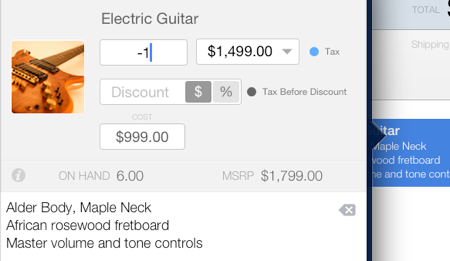
- Create a new invoice. If multiple items are being returned, you can duplicate the original invoice and modify the quantity of the items being returned
- Add the item being returned to the invoice (in not on the invoice yet)
- Select the line item from the right side of the sales document section
- In the Qty field enter -1
To enter negative numbers first enter the number [1] and then tap the minus [-] button on the numeric keyboard.
- Tap Accept
- The total amount will become negative (refund). Apply a payment to record the refund.