Taxes
Transactions are Taxable by Default
If you charge tax on any item or service then you must enable this option. If this option is disabled then no tax will be calculated by default even if the items are configured as taxable.
Calculate Tax Before Discount by Default
(Not used when Tax Inclusive is ON)
The tax will be calculated before any discount is applied. You can adjust this setting on a per-invoice basis and on each item on the invoices.
Tax 1 Rate
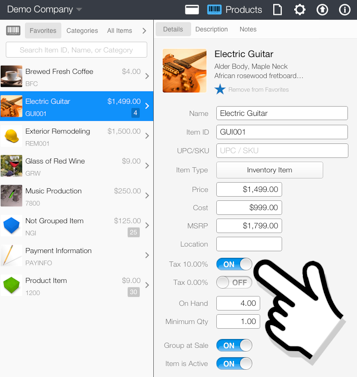
Items with the Tax 1 switch enabled will be taxed at this rate. (Inventory section)
Tax 2 Rate
Items with the Tax 2 switch enabled will be taxed at this rate. (Inventory section)
Tax Inclusive
If your country tax rules requires you to include the tax in the price then this option should be ON, otherwise this option should be OFF.
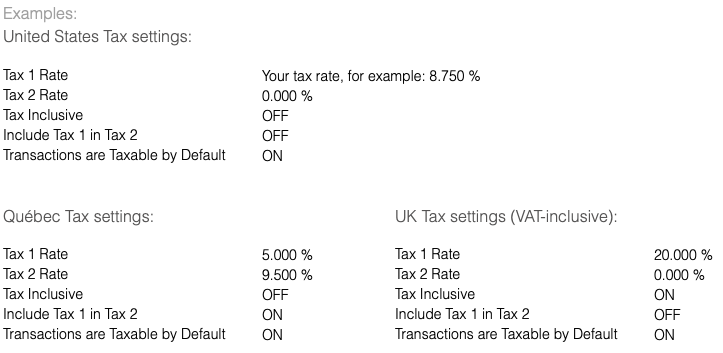
Users located in the United States should turn OFF this option.
Important: Any changes to this setting will be applied to new invoices only.
Include Tax 1 in Tax 2
The tax will be calculated based on the combination of the 2 taxes (Tax 1 & Tax 2). Canada only.
Additional settings required to calculate the Tax:
- Products
In the products section verify that each taxable item has the tax rate(s) switch turned ON.