Sales
Displaying the Profit and Margin for an Item
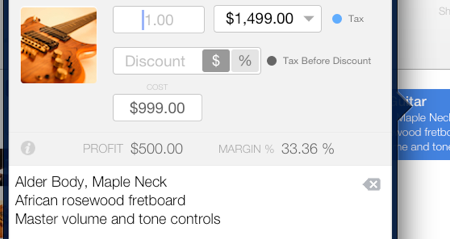
A profit calculation can be presented on a per-item basis, which is beneficial when modifying the price or applying a discount.
To accurately calculate the profit, the item’s cost must be entered by following these steps:
- Select the line item from the line items area.
- Tap the information button located at the left side of the middle section of the editing box. The profit and margin will be displayed.
The profit amount is the difference between the sales price and the cost.
For instance: $10.00 (sales price) - $6.00 (cost) = $4.00 (profit)
The margin indicates the percentage of the profit relative to the sales price. A higher margin signifies a higher profit.
With the example provided, the margin is 40%. In other words, 40% of the sales price constitutes profit.